Sequoia 1.5.8: Updated Exercise Design & Haptic

-
07 January 2026
-
21 April 2026

Hey everyone!
Today I’m especially happy to share Sequoia version 1.5.8. Why especially? Sit back - I’ll explain.
The Delayed Release - What Happened
This update was supposed to come out before the New Year. We really tried, but things didn’t go as planned. First, we waited 7 days for the build review. Then it got rejected.
The reason? Our keywords were flagged as hinting at sexual content or services.
Fair enough - we are a sexual health app, and yes, we use related keywords. But Apple has been tightening its rules around sexual health apps more and more. What passed in 2024–2025 might not pass in 2026. That’s just the new reality, so we stayed calm.
If to look closer, the rejection basically said we used “unacceptable terms.” Very specific, right?
Unfortunately, App Store support rarely explains what exactly is wrong. You usually just get something like “You violated Guideline 1.1.”
Only after some back-and-forth did we learn the issue was with keywords.
And keywords matter. People don’t usually search for “erectile dysfunction.” They search in much simpler - and sometimes very rough - terms.
To make sure Sequoia shows up in search results, we have to include a wide range of wording - from medical to very informal. And right before the holidays, Apple suddenly decided that was a problem.
So after a few days of analysis, edits, and another round of review - boom. Version 1.5.8 was finally approved.
Now the big question is whether app impressions will drop after these changes. We won’t know for about a month. If you’re curious, I’ll share the results in the next release post.
But for now, let’s talk about what’s new in 1.5.8.
Small but Important Improvements
In the 1.5.6 release post, I shared how redesigning the onboarding screens increased the number of users reaching the home screen from 14.2% to 32.7%. That’s great - but there’s more room to grow.
There were three more screens where we were losing about 45% of users combined. We redesigned those too and launched A/B tests.
What is A/B Testing?
Since this is a deep dive, let me explain it simply. Imagine this: analytics show that 81% of users reach a screen that mentions an upcoming test, but only 67% move to the next one. That means 14% dropped off - they closed the app and probably deleted it.
A small drop is normal. But 14% is a red flag. The problem is, we never know exactly why users leave. So we create two versions of the same screen. Half the users see the old one, half see the new one. After some time, we compare results and keep the version that performs better.
That’s A/B testing.
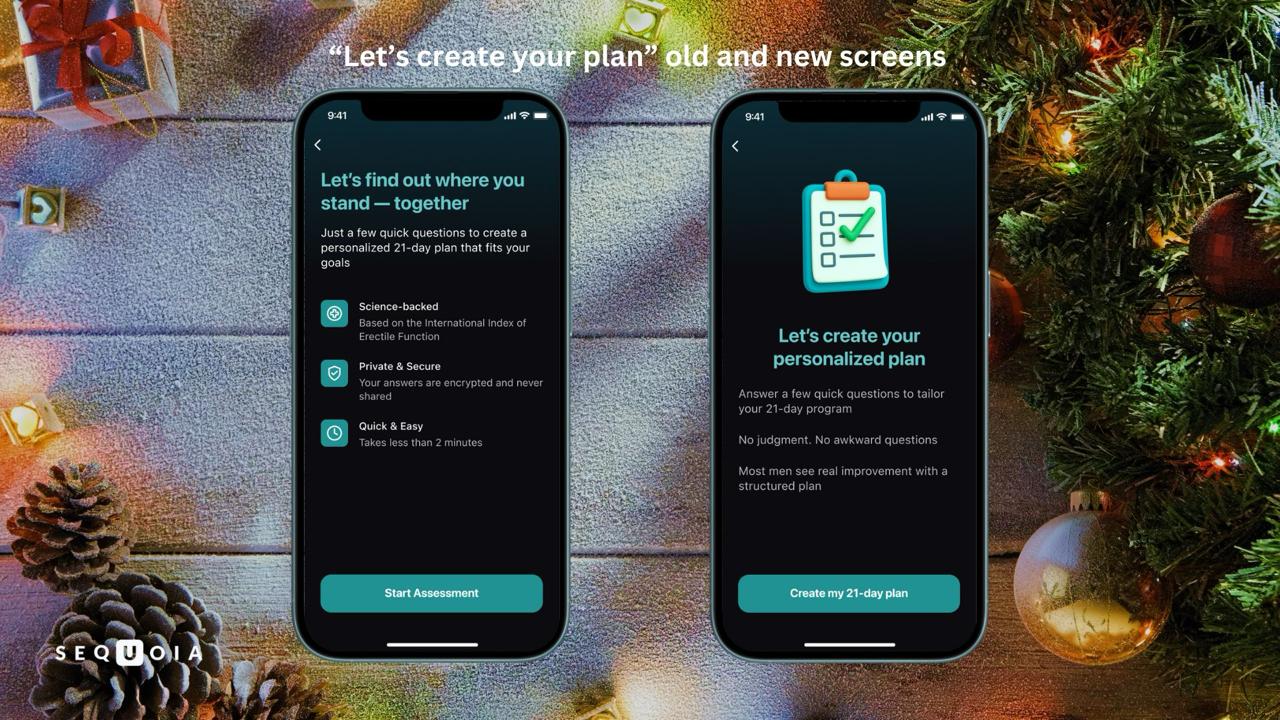
Good product teams use A/B testing for almost every meaningful change.
New Exercise Design
We seriously reworked the exercise section: new texts, new backgrounds, new visuals. Everything now matches Sequoia’s updated style.
But the biggest changes are on:
- the exercise completion screen
- the level-up screen
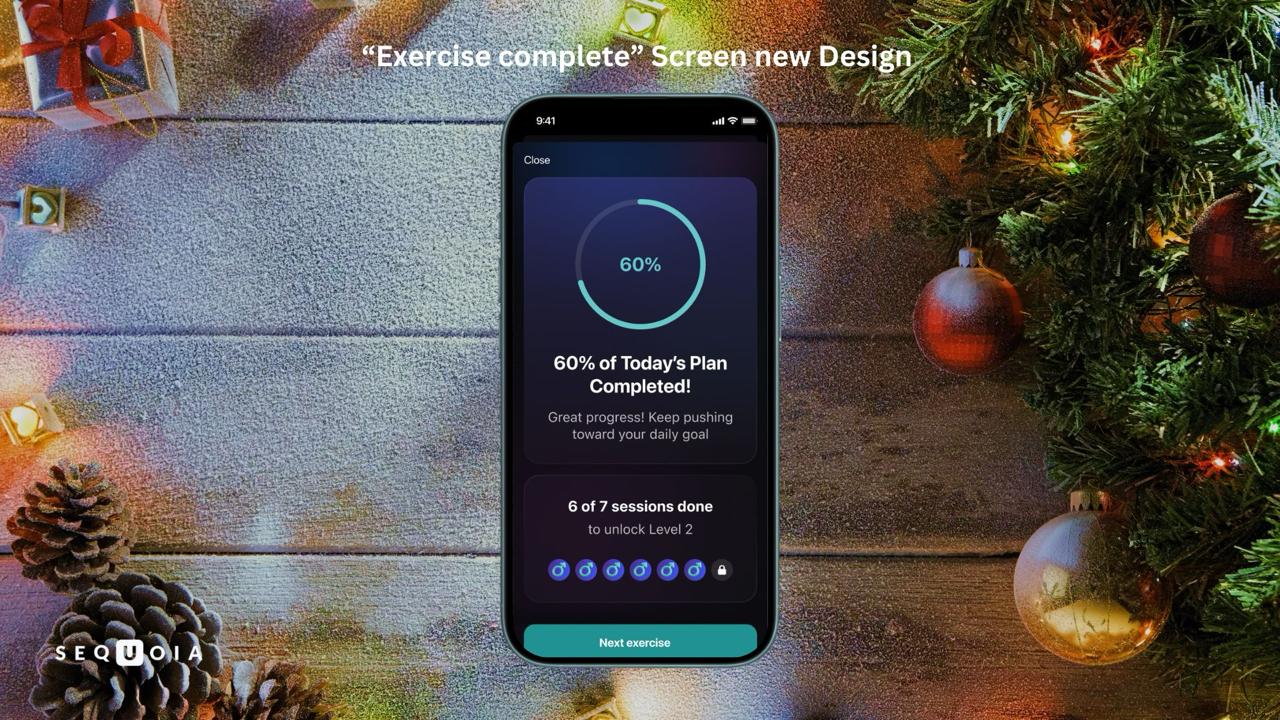
Exercise completion screen
Before, it only showed how much of your daily plan you completed.
Now it includes:
- a motivational message (different every day)
- haptic feedback (more on that below)
- info on how many exercises are left before unlocking the next level
Level-up screen
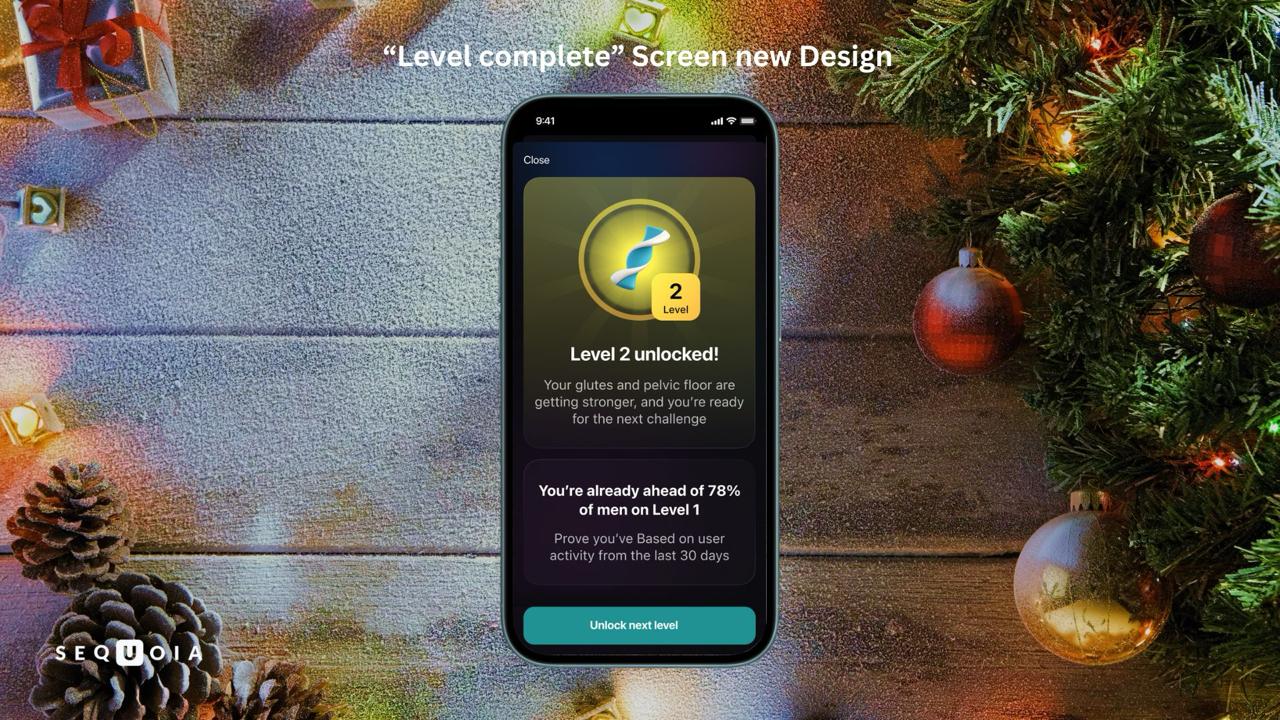
This screen now feels like a real win.
You’ll see:
- a big glowing exercise icon
- a congratulatory message
- haptic feedback
- and even a line like: “You're already ahead of N% of men on Level 1”
The goal is simple: make sure you feel that your effort matters - and get that well-earned hit of recognition and dopamine.
Haptic Feedback
Haptic feedback might seem minor, but it’s powerful.
It’s that small vibration you feel when you do something in the app. It creates a tactile connection and, when used right, becomes a strong communication tool.
Sequoia already had haptic feedback, but only inside exercises - and it was pretty long.
In 1.5.8, we refined the timing and expanded where it’s used.
Now you’ll feel it:
- during the IIEF test in onboarding
- in the tab bar
- on exercise completion screens
- on exercise level-up screen
- and in other key moments
Hope you like it.
What’s Next?
In the next version, we’ll keep redesigning existing features to make them more pleasant, intuitive, and engaging.
We’re also replacing synthetic voiceovers with real human voices. We know how important this is for audio-focused users, and we’re excited to finally make it happen.
And lastly, there’s a good chance online consultations will finally launch properly.
So yes, exciting things ahead. Stay tuned!
Warm regards,
Dzianis Halka
CEO of Sequoia


Start Your Personalized Program




.svg)
.svg)